
Does Arlo Work Without a Subscription? (2026)
Yes — Arlo cameras work without a subscription, but only for live view, basic motion alerts and two-way talk. There is no free cloud recording: to save clips you need a paid Arlo Secure plan or a SmartHub with local USB storage.
Published 28 September 2026 · Updated 28 September 2026
Disclosure: This article currently contains no affiliate links — nothing here earns us a commission. If that changes, we’ll say so.
Key Takeaways
- Yes, Arlo works without a subscription — live view, basic motion alerts and two-way talk all function on the free tier.
- No free cloud recording: without a plan you cannot save, replay or download clips.
- You lose the smart features — AI detection, activity zones, rich notifications and 60-day video history are all paywalled.
- The SmartHub USB workaround records locally but gives you raw clips with no smart features, and costs $99.99 plus a drive.
- Verdict: budget the Arlo Secure plan from day one, or buy Eufy, Tapo or Wyze for genuinely free recording.
Yes — but only for live view, basic motion alerts, and two-way audio. Without a subscription, Arlo cameras cannot record anything.
That’s the critical fact most product pages bury. On current Arlo cameras there is no free cloud recording tier — the 7-day free history older models shipped with is not offered on new models. No plan means no saved clips, no AI detection, no activity zones, and no rich notifications. Arlo’s own community support confirms it: without a subscription you “only retain basic notifications and live viewing.”
What works without a plan, by model

| Model | Live view | Basic motion alerts | Two-way audio | Recording (no plan) | Local storage option |
|---|---|---|---|---|---|
| Essential 2K Outdoor (3rd Gen) | ✅ | ✅ | ✅ | ❌ None | ⚠️ Via SmartHub + USB only |
| Essential Indoor 2K | ✅ | ✅ | ✅ | ❌ None | ⚠️ Via SmartHub + USB only |
| Pro 2K (6th Gen) | ✅ | ✅ | ✅ | ❌ None | ⚠️ Via SmartHub + USB only |
| Ultra 4K (3rd Gen) | ✅ | ✅ | ✅ | ❌ None | ⚠️ Via SmartHub + USB only |
| Video Doorbell 2nd Gen (2K) | ✅ | ✅ | ✅ | ❌ None | ⚠️ Via SmartHub + USB only |
| Go 2 (LTE) | ✅ | ✅ | ✅ | ❌ None | ⚠️ MicroSD in-camera only (not SmartHub-compatible) |
Sources: revellphotography.com Arlo review 2026; surveillanceguides.com; Arlo community — accepted solution; Android Central — Video Doorbell 2nd Gen review.
What you’re actually missing (the paid features)

The free tier sounds okay until you list what’s behind the paywall:
- Cloud recording — 60 days of video history on Arlo Smart Aware
- AI detection — person, vehicle, package, animal, and facial recognition
- Activity zones — the single best cure for false alerts
- Rich notifications — animated previews so you can see the event without opening the app
- Smart alerts — smoke/CO alarm listening, custom detection events
- Emergency response / professional monitoring — Smart Secure only
Without AI detection and activity zones, expect significantly more — and dumber — notifications.
To decide whether those paid features are worth paying for, read is Arlo Secure worth it — the 3-year math is less forgiving than the monthly price looks.
The local-storage workaround

The main way to record Arlo footage without a plan is the Arlo SmartHub (VMB4540, $99.99), which has a USB port for a flash drive or external drive. Pair your cameras to the hub instead of Wi-Fi directly, and motion events save locally. (The exception is the Go 2, which records to an in-camera microSD card instead of pairing with a hub.)
The catches, honestly stated:
- Smart features still need the plan. Local recording gives you raw clips — no person detection, no activity zones, no rich notifications.
- No encryption, remote viewing can be unreliable. Local footage isn’t encrypted, and remote viewing through the app depends on the hub being online — some users report needing port forwarding or a VPN.
- The doorbell now works too. Since late 2024, the Video Doorbell 2nd Gen can pair with the SmartHub VMB4540/VMB5000 for local recording — no longer cloud-or-nothing.
- It costs $99.99 plus a drive. At that point you’re halfway to a year of the unlimited plan anyway.
Our verdict: the SmartHub workaround makes sense only if you already own one, or you specifically want an air-gapped local archive. As a plan-avoidance strategy for a new buyer, it’s worse value than just buying Eufy.
What about the free trial?
New Arlo cameras typically include a trial of Arlo Smart Aware — commonly one month, occasionally longer on bundles. During the trial you get the full paid experience: recording, AI detection, activity zones. When it expires, everything paid stops. Set a calendar reminder if you don’t intend to subscribe, and check your Arlo account — trial lengths and auto-billing behavior have varied by bundle and region.
The honest comparison: Arlo without a plan vs. the alternatives
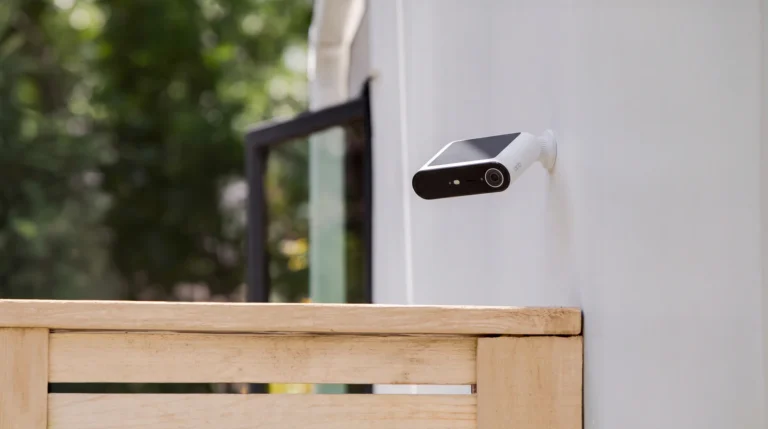
An Arlo Essential 2K at $99.99 with no plan is a $100 live-view camera — and Arlo’s solar-powered camera plays the same game at the same price, adding an integrated panel but keeping the plan requirement. For the same money or less, these record with no subscription at all:
- Eufy Indoor Cam C120 (~$50) — 2K, microSD recording, no fees
- Tapo C120 (~$40) — 2K, microSD + optional Tapo Care, no fees required
- Wyze Cam v4 (~$45; deals around $38–40 as of Sept 2026) — 2.5K, microSD recording, optional Cam Plus
If you’re buying Arlo because it’s Arlo — the app, the video quality, the ecosystem — budget the plan from day one. Our cost breakdown: Is Arlo Secure Worth It?. If you want great hardware with zero ongoing cost, the comparison you need is Eufy vs Arlo Without a Subscription.
For a wider look at budget cameras that work without a subscription: see our Wyze vs Blink showdown — the $36 Wyze records 24/7 to microSD with no plan at all.
Pros: Eufy Indoor Cam C120
- ~$50, genuinely free 2K recording to microSD — no plan, no hub, no catch.
- AI person detection included free, plus activity zones.
- Small, sharp, and well-reviewed — the default “I just want it to work” pick.
Cons
- Indoor-only (unless sheltered) — for outdoors, look at the Eufy SoloCam series instead.
- No 24/7 continuous recording — event clips only.
- Eufy app is fine, not great — Arlo’s app and AI polish are better.
Ring is the other brand where no plan means no recording — see what a Ring doorbell does without a subscription.
Late-2026 update: the SmartHub workaround, spelled out properly
The workaround on this page works — but only with the right hardware, and with limits buyers should hear before they spend. Direct Storage Access needs a VMB4540 or VMB5000 SmartHub. Older base stations, including the VMB3000, cannot do it: a doorbell or camera on an old base will not record without a plan, and moving it to a SmartHub means resetting it and pairing it again from scratch.
The setup itself is specific. You need at least 16GB of storage attached to the SmartHub, formatted through the app, with Direct Storage Access enabled in the hub settings. Remote viewing from away from home is possible, but it needs router changes (port forwarding) that some users find difficult, and it does not work with every internet provider.
And the limits are real: no thumbnails until you download and view each clip, no access from the Arlo web client, no sharing with friend accounts, no manual recordings or snapshots, and no AI detection or activity zones — those stay behind the paywall. It is a workable no-fee setup, not a free version of the subscription.
One hardware note: Arlo’s Essential Solar camera launched 29 September 2026 at $99.99 with a built-in solar panel. It does not change the subscription math — the same free tier applies — but it does remove the battery-charging chore from the no-plan setup.
Frequently asked questions
Can I watch Arlo recordings later without a subscription?
No. Without a plan there are no recordings to watch later — only the live feed, in the moment.
Do motion alerts still work without a subscription?
Yes, basic motion alerts work — but without preview thumbnails or AI labels, so every alert just says “motion detected” and you have to open the live view to see what it was.
Will my old Arlo camera keep its free 7-day cloud storage?
Some legacy models and grandfathered accounts retained limited free tiers — but Sept 2026 Arlo Community threads show some Pro 2 users losing access (cases escalated to support). Don’t buy a used older camera counting on it — verify in your Arlo account.
Does the Arlo app work without a subscription?
Yes — live view, device settings, basic alerts, and two-way talk all work in the free app. Only cloud and smart features are gated.
Can I use an SD card in the camera itself?
Most current Arlo cameras don’t have onboard SD slots — local storage runs through the SmartHub’s USB port. The Go 2 is the exception: it records to an in-camera microSD card and cannot pair with a SmartHub.
Does Arlo camera work without a subscription?
Yes, but with limits. Without a subscription you get live view, basic motion alerts and two-way audio — but no recording, so there’s nothing to replay or download. Cloud recording, AI detection, activity zones and video history all need an Arlo Secure or Smart Aware plan.
Is Arlo free?
No. Arlo cameras cost money to buy, and the features most people want — recording, AI detection, activity zones and cloud history — sit behind paid Arlo Secure/Smart Aware plans. Without a plan you only get live view, basic motion alerts and two-way audio.
Can I use my old Arlo base station for local recording?
No. Direct Storage Access needs a VMB4540 or VMB5000 SmartHub. Older bases such as the VMB3000 cannot do it, and a camera or doorbell moved to a SmartHub must be reset and re-paired to it.
Can I watch local recordings when I am away from home?
Yes, but it takes router setup (port forwarding), and it does not work with every internet provider. On your home Wi-Fi it works through the app; away from home is the part that trips people up. If remote access matters to you, test it before you commit to the no-plan route.
Does the free trial change the answer?
Only temporarily. A trial is typically applied automatically when you set a new device up (where subscriptions are available). When it ends, recording stops unless you pay for a plan or have the SmartHub local-storage setup already running. Set the SmartHub up before the trial ends, not after.
Recent updates
- 28 September 2026 — Restructured with Key Takeaways, quick list and FAQ; re-verified specs and prices.
Why you can trust AbodeAlly
AbodeAlly is a research-based buying guide, not a test lab. We don’t run a warehouse of gadgets or a lab bench, so we never invent hands-on test results.
Every pick starts with manufacturer specifications and standards documents, cross-checked against reputable expert reviews and long-term owner feedback. We re-verify specs and prices on a regular update cadence, and each article carries a dated changelog so you can see exactly what changed and when.
Spot an error or an out-of-date price? Tell us and we’ll fix it — corrections are published openly, not buried.
The bottom line
Arlo works without a subscription the way a sports car works without fuel in the tank — technically present, functionally pointless for its actual job. If you’ll subscribe, it’s among the best camera systems you can buy. If you won’t, buy a camera designed for that.
Your next step
- Is Arlo Secure Worth It? The True 3-Year Cost (2026) — Weigh up the true 3-year cost of Arlo Secure.
- Eufy vs Arlo Without a Subscription: Which Is Actually Cheaper in 2026? — See how Eufy compares when neither brand has a subscription.
- Home Security Without a Subscription (2026): The Complete Guide — The complete guide to ditching security subscriptions.
AbodeAlly Editorial Team
AbodeAlly’s editorial team researches smart-home gear full time. We verify specifications against manufacturer and standards sources, cross-check reputable expert reviews and long-term owner feedback, and re-verify every guide on a regular cadence. We don’t run a test lab, so we never invent hands-on test results.



5 Comments