
Reolink PoE Video Doorbell Review (2026): The No-Subscription Wired Doorbell
Reolink PoE Video Doorbell Review (2026): The No-Subscription Wired Doorbell
Disclosure: this guide contains no affiliate links — we earn no commission if you buy. We’d rather you know exactly where we stand.
The Reolink Video Doorbell PoE is a 5MP wired video doorbell that runs on a single Ethernet cable for both power and data, records 24/7 to local storage, and charges zero monthly fees — and yes, it’s worth it if you can get a network cable to your front door. At around $100 (typically $99–$110, discounted from a $149.99 list price), it undercuts subscription rivals by hundreds of dollars over its lifetime.
Most video doorbells are really just subscription boxes with a camera attached. Ring’s 2026 plans start at $4.99 a month for one device and climb to $19.99 a month — and without a plan you get live view and alerts but can’t save a single clip of footage. Reolink flips that model: the hardware costs about the same as one year of Ring Protect, then recording is free forever. We’ve tested the whole no-subscription doorbell category, and the PoE Reolink is the one we’d hardwire into our own homes. Here’s why.
What exactly is the Reolink PoE video doorbell?
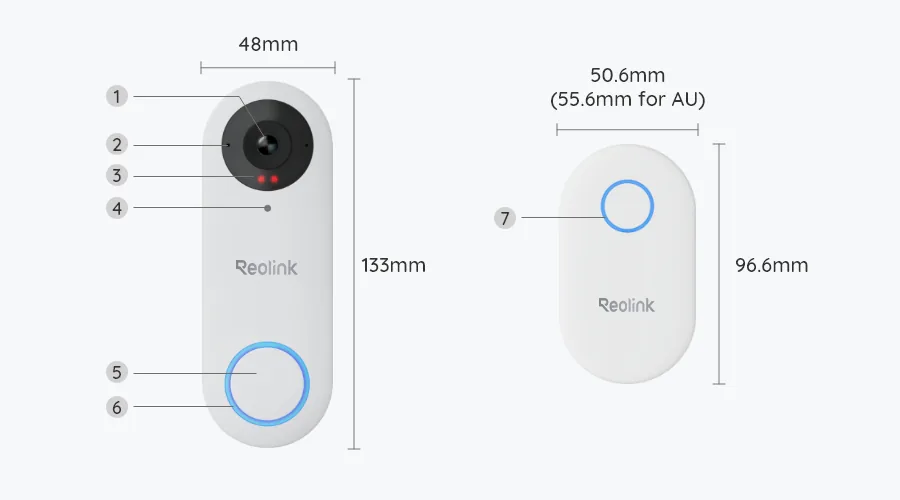
The Reolink Video Doorbell PoE is a wired smart doorbell launched by Reolink — the Chinese security-camera maker that has quietly become the darling of the DIY home-security crowd. Instead of connecting to your Wi-Fi, it plugs into your home network with a Cat5e or Cat6 Ethernet cable, and that same cable powers it. No battery to charge, no transformer to wire, no dead zones at the front door.
The core specs are strong for the price:
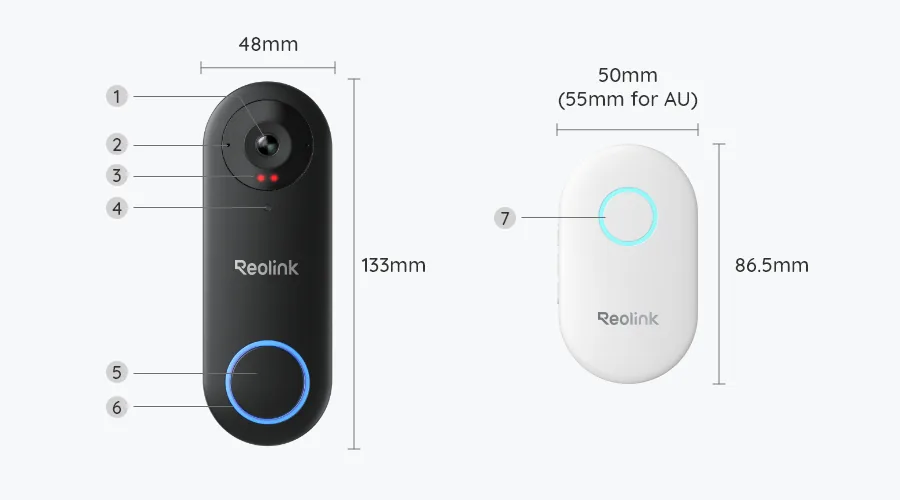
- Resolution: 2K+ 5MP (2560 × 1920 on the black model; the white model flips to a 1920 × 2560 portrait frame)
- Field of view: 180° diagonal — 135° horizontal / 100° vertical on black, 100° / 135° on white
- Power: IEEE 802.3af Power over Ethernet, or 12–24V AC / 24V DC as a fallback
- Night vision: Infrared night vision with a color spotlight
- Audio: Two-way audio with a built-in microphone and speaker
- Detection: On-device person detection; the white version adds package detection
- Weatherproofing: IP65 — handles rain, dust, and freezing mornings
- Smart home: Works with Alexa, Google Assistant, and Home Assistant; native RTSP and ONVIF streams
- What’s in the box: The doorbell and a Reolink plug-in chime, plus mounting hardware
Reolink backs it with a 2-year limited warranty, a 30-day money-back guarantee, and free shipping on its own store.
What does PoE mean for a doorbell buyer?
PoE stands for Power over Ethernet. In plain English: one cable carries both the electricity and the network data. The doorbell gets a standard Ethernet run from your router, PoE switch, or NVR, and that single connection is the entire install.
For a doorbell, that matters more than it sounds. Battery doorbells wake from sleep, which introduces lag and misses pre-event footage. Wi-Fi doorbells live or die by signal strength at the front door — the spot in many homes where the router is furthest away. A PoE connection is wired, always-on, and immune to weak signal.
The trade-off is obvious: you need an Ethernet cable to the door. If your house already has network cabling, a PoE switch, or a Reolink NVR, this is a ten-minute job. If it doesn’t, you’re running a cable — and that’s the entire decision in one line: existing cable, buy it; no cable and no appetite for DIY, pick the Wi-Fi or battery model instead.
Is PoE better than WiFi for a doorbell?
For reliability, yes — with one honest caveat about installation effort. A wired Ethernet connection can’t be slowed by a crowded 2.4GHz band, a brick wall, or a neighbor’s router. It also unlocks the doorbell’s best features: 24/7 continuous recording and a 6-second color pre-recording buffer that captures the moments before motion is detected, so you see the delivery driver walking up, not just walking away.
Smart Home Explorer, which benchmarks no-subscription doorbells in depth, put it bluntly: “Reolink Video Doorbell PoE wins overall, one Ethernet cable, a real RTSP and ONVIF stream into Frigate or Blue Iris, and a Home Assistant doorbell-press event, with no subscription.” That RTSP/ONVIF support is the PoE model’s quiet superpower — it pipes straight into Blue Iris, Frigate, or Synology Surveillance Station, treating your doorbell like any other serious IP camera.
Wi-Fi wins on one thing: ease. If you already have doorbell wiring and a decent signal at the entryway, the Wi-Fi version does the same 5MP job without the cable run. But if your front door is a Wi-Fi dead spot, or you’re building a proper camera system with an NVR, PoE is the grown-up choice. And in the wider market, wired options are getting more attention for exactly this reason — as of April 2026, 39% of American homes already had a video doorbell, according to industry survey data cited by PetaPixel, and reliability complaints cluster around Wi-Fi and battery models.
Do Reolink doorbells need a subscription?
No. This is the whole point of the product. Person detection, motion alerts, two-way audio, live view, and video history all work with zero monthly fees. Reolink sells an optional cloud plan in some regions, but it is never required for the doorbell’s core functions.
That stands in sharp contrast to the subscription giants. Ring’s 2026 lineup renamed its plans: Ring Solo ($4.99/month, one device), Ring Multi ($9.99/month, every device at one home), and Ring Pro ($19.99/month or $199.99/year). Without any plan, a Ring doorbell still shows live video and sends alerts — but saves nothing. Over three years, a Ring Wired Doorbell Pro ($249.99 hardware) plus Ring Solo costs roughly $430. The Reolink costs about $100 once.
There’s also a privacy angle. Recordings live on your microSD card, your NVR, or your own FTP/NAS server — not on someone’s cloud. Our broader guide to subscription-free home security digs into why that matters, but the short version: no cloud means no footage held hostage behind a paywall and no third party deciding what “your” video costs to watch.
How to set up the Reolink PoE doorbell
Setup breaks into five steps. None of them is hard; the cable run is the only part that takes real time.
1. Run the Ethernet cable
Get a Cat5e or Cat6 cable from your router, PoE switch, or NVR to the doorbell location. Reolink’s own guidance says the same: connect the doorbell with a Cat5e or Cat6 cable to a compatible PoE NVR, PoE switch, or PoE injector. If you don’t own a PoE switch, a single-port PoE injector (around $15–$20) sits between your router and the doorbell and adds power to the line. Drill, mount with the included screws and template, and plug in.
2. Add it to the Reolink app
Open the Reolink app, tap the plus icon, and scan the QR code on the back of the doorbell (or enter the UID manually). Create a login password and name the device. The app walks through Wi-Fi-free pairing since the network comes through the cable.
3. Pair the chime
The box includes a Reolink plug-in chime — plug it into an indoor outlet and pair it through the app. One honest note: the PoE model doesn’t support old mechanical chimes, so plan on using Reolink’s chime (which supports custom ringtones) rather than your 1970s ding-dong. You can also get doorbell announcements through an Echo or Google Nest speaker.
4. Configure detection zones
Draw motion zones in the app to exclude the street and passing cars. Person detection runs on-device and is free — no cloud round-trip, no paywalled alerts. The white model adds package detection, useful if parcels get dumped on your mat.
5. Set up recording
Pop in a microSD card (up to 256GB, high-endurance cards are worth it for 24/7 writing) or point the doorbell at your Reolink NVR or FTP server. Enable continuous recording, motion-triggered clips, or a schedule — or all three. Pre-recording grabs 6 seconds of color video before each event, which is the difference between seeing a face and seeing a back.
If running any cable at all is a non-starter — say, you’re renting — Reolink’s battery model is the honest alternative; more on that below.
Local storage explained: microSD, NVR, and 24/7 recording
The PoE doorbell gives you four independent recording paths: a microSD card in the unit (up to 256GB), a Reolink NVR with its own hard drive, an FTP/NAS server, and the Reolink Home Hub Pro with a pre-installed 2TB drive. All four work without a subscription.
The headline feature is 24/7 continuous recording — always-on, wired power makes it possible, and the microSD or NVR stores a smooth timeline instead of fragmented motion clips. That matters when something happens between motion events. Continuous recording does chew through storage and wears microSD cards faster than event-only clips, so buy a surveillance-rated high-endurance card and size your NVR storage for how many days of history you actually want.
For comparison, this is where subscription doorbells quietly tax you: Ring’s plans keep up to 180 days of event history, but only while you pay. Stop paying, lose the history. With the Reolink, your footage sits on hardware you own.
Reolink PoE vs WiFi vs Battery: which should you buy?
Reolink sells three doorbells, and choosing wrong is the most common buyer’s mistake. Here’s the honest breakdown, drawn from Reolink’s own spec sheets:
Video Doorbell PoE — the one in this review. 5MP (2560×1920), wired Ethernet, IEEE 802.3af, 24/7 continuous recording, 6-second pre-recording, microSD up to 256GB plus NVR/FTP, native RTSP/ONVIF, direct Home Assistant integration. Best for: homes with Ethernet wiring or an existing PoE camera system. The pick for NVR owners and smart-home tinkerers.
Video Doorbell WiFi — same 5MP sensor and 180° diagonal view, same local storage and 24/7 recording, but powered by existing doorbell wiring (12–24V AC / 24V DC) and connected over dual-band Wi-Fi. It adds Reolink Cloud support and rich notifications, which the PoE model skips. Best for: the easy retrofit — you have old doorbell wiring and solid Wi-Fi at the door. Typical price is in the same $90–$120 band.
Video Doorbell Battery (2nd Gen) — the renter’s pick. 2K 4MP with a 1:1 head-to-toe square view (better for seeing faces and parcels), person/vehicle/animal/package detection, HDR, and a battery Reolink rates at up to 10 months. Recording is motion-triggered only on battery (continuous needs wired power), storing to microSD (up to 512GB) or a Reolink Home Hub. Best for: apartments and rentals where you can’t — or won’t — run a single wire.
The pattern is simple. Permanent installation with network cable: PoE. Existing doorbell wiring and good Wi-Fi: WiFi. No wiring at all: Battery 2nd Gen. Still deciding between a doorbell and a regular security camera at the entryway? That’s a separate decision worth five minutes.
| Feature | Reolink Video Doorbell PoE | Reolink Video Doorbell WiFi | Ring Wired Doorbell Pro (3rd gen) |
|---|---|---|---|
| Typical price | ~$99–$110 (list $149.99) | ~$90–$120 | $249.99 |
| Resolution | 5MP (2560 × 1920) | 5MP (2560 × 1920) | 4K |
| Power | PoE (IEEE 802.3af) or 12–24V AC/DC | 12–24V AC / 24V DC wired | Wired |
| Network | Ethernet | Dual-band Wi-Fi | Wi-Fi |
| Subscription needed | No — full features free | No — full features free | Yes — from $4.99/mo to save footage |
| Recording | 24/7 continuous + motion; 6s pre-roll | 24/7 continuous + motion; 6s pre-roll | Event clips; 24/7 on top plan only |
| Local storage | microSD 256GB, NVR, FTP/NAS, Home Hub | microSD 256GB, NVR, FTP/NAS, Home Hub | None — cloud only |
| Smart home | Alexa, Google, Home Assistant, RTSP/ONVIF | Alexa, Google, Home Assistant, RTSP/ONVIF | Alexa (+ Ring ecosystem) |
| Chime | Reolink chime in box | Reolink chime in box | Ring Chime sold separately |
| Best for | PoE/NVR households, reliability-first buyers | Easy retrofit on existing wiring | Alexa-heavy homes that accept the subscription |
Deals Is Here, reviewing the no-subscription doorbell field, summed up the PoE Reolink’s edge: “No other consumer option gives you this level of integration with your own network infrastructure at this price point.” Ring fights back on resolution — 4K versus 5MP — and on ecosystem polish. But Ring’s hardware costs 2.5× more and then bills you monthly to use its best features. For a doorbell whose job is to show you who’s at the door and keep the footage, that’s a hard sell.
Pros and cons
Pros: No subscription for any feature, including person detection and video history. One-cable PoE install with 24/7 continuous recording. Native RTSP/ONVIF and direct Home Assistant integration. microSD, NVR, FTP, and Home Hub storage options. IP65 weatherproofing. Chime included in the box. Two-year warranty.
Cons: You need an Ethernet cable to the door — the whole pitch collapses without it. No HomeKit support (HomeBridge is the workaround). No mechanical-chime support; you’re using Reolink’s chime. The app is functional rather than polished, and facial recognition is basic next to eufy’s. The 5MP sensor is sharp in daylight but a step behind 4K rivals for fine face detail at distance.
Verdict
The Reolink Video Doorbell PoE is the best wired video doorbell for anyone who refuses to pay a monthly fee — provided you can get an Ethernet cable to your front door. Around $100 buys 5MP video, 24/7 local recording, on-device person detection, and open-protocol integration that plays nicely with Home Assistant, Blue Iris, and Frigate. Nothing else at this price does all of that without a subscription.
Buy it if: you have (or will run) an Ethernet cable to the door, you run an NVR or Home Assistant, or you’re done renting your security footage from Ring. Skip it if you rent and can’t run cable — the battery Reolink or another subscription-free pick will serve you better. The cable is the entire decision. Everything else is a detail.
Frequently asked questions
Does the Reolink PoE doorbell require a subscription?
No. Person detection, motion alerts, two-way audio, live view, and video history all work without any subscription. Recordings save to a microSD card (up to 256GB), a Reolink NVR, an FTP/NAS server, or a Reolink Home Hub. An optional cloud plan exists in some regions but is never required.
What is PoE and do I need special equipment?
PoE (Power over Ethernet) delivers power and data over a single Ethernet cable. You need a Cat5e or Cat6 cable run to the door, plus a PoE switch, a PoE-capable NVR, or a single-port PoE injector (about $15–$20) between your router and the doorbell. The doorbell uses the IEEE 802.3af standard.
Can the Reolink PoE doorbell record 24/7?
Yes. Because it’s always powered, it supports 24/7 continuous recording alongside motion-triggered and scheduled recording, stored locally. It also captures 6 seconds of color pre-recording before each motion event, so you see what led up to the trigger.
Does it work with my existing mechanical doorbell chime?
No — the PoE model doesn’t support legacy mechanical chimes. It ships with a Reolink plug-in chime in the box (with customizable ringtones), and you can also get announcements through Alexa or Google Assistant speakers and smart displays.
What’s the difference between the black and white versions?
Both are 5MP, but the black model uses a 4:3 landscape frame (2560×1920, 135° horizontal view) while the white model uses a 3:4 portrait frame (1920×2560, 135° vertical view) — better for seeing packages on the ground. The white version also adds package detection.
Is the Reolink PoE doorbell better than Ring?
It depends what you value. The Reolink costs around $100 with no subscription and local storage; the Ring Wired Doorbell Pro costs $249.99 plus $4.99–$19.99/month to save footage. Ring offers 4K resolution and a more polished app. If you want zero monthly fees and own your recordings, Reolink wins. If you’re deep in the Alexa/Ring ecosystem and don’t mind the subscription, Ring is the smoother pick.
Sources
- Reolink — Video Doorbell PoE official product page: https://reolink.com/gb/product/reolink-video-doorbell-poe/
- Reolink — Video doorbells US store page: https://store.reolink.com/us/video-doorbells/?from=store-homepage
- Reolink support — Introduction to Reolink Video Doorbell Cameras (full spec comparison): https://support.reolink.com/articles/16929500357657-Introduction-to-Reolink-Video-Doorbell-Cameras/
- Reolink — Doorbell PoE vs WiFi breakdown: https://reolink.com/blog/reolink-video-doorbell-2nd-gen-vs-poe-vs-wifi/
- Reolink — Best doorbell camera 2026 (comparison table): https://reolink.com/blog/best-doorbell-camera/
- Reolink — Are PoE video doorbells worth it (homeowner’s guide): https://reolink.com/blog/poe-doorbell-guide/
- The Gadgeteer — Best Wired Video Doorbells 2026: PoE, 4K, and Buyer’s Guide: https://the-gadgeteer.com/2026/06/18/best-wired-video-doorbells-2026/
- Smart Home Explorer — Best PoE Video Doorbells Without Cloud Subscription (2026): https://www.smarthomeexplorer.com/guides/best-poe-video-doorbells-non-cloud-2026
- DataWire Solutions — Reolink Video Doorbell PoE vs WiFi: Which Should You Buy?: https://datawiresolutions.com/blog/reolink-video-doorbell-poe-vs-wifi
- Prime Tech Advisor — Best Video Doorbell Without Subscription Picks (2026): https://primetechadvisor.com/best-video-doorbell-without-subscription/
- Deals Is Here — Best Smart Doorbells 2026: The Auditor’s Guide To Perimeter Security: https://www.dealsishere.com/best-smart-doorbells-no-subscription-guide/
- Gizmodo — Reolink’s 2K Video Doorbell Charges No Monthly Fee and Is 30% Off (Oct 2026): https://gizmodo.com/sorry-ring-reolinks-2k-video-doorbell-charges-no-monthly-fee-and-is-30-off-2000822680
- PetaPixel — Apple and LG Bring Connected Cameras To Your Home (Oct 13, 2026): https://petapixel.com/2026/10/13/apple-and-lg-bring-connected-cameras-to-your-home/



4 Comments