
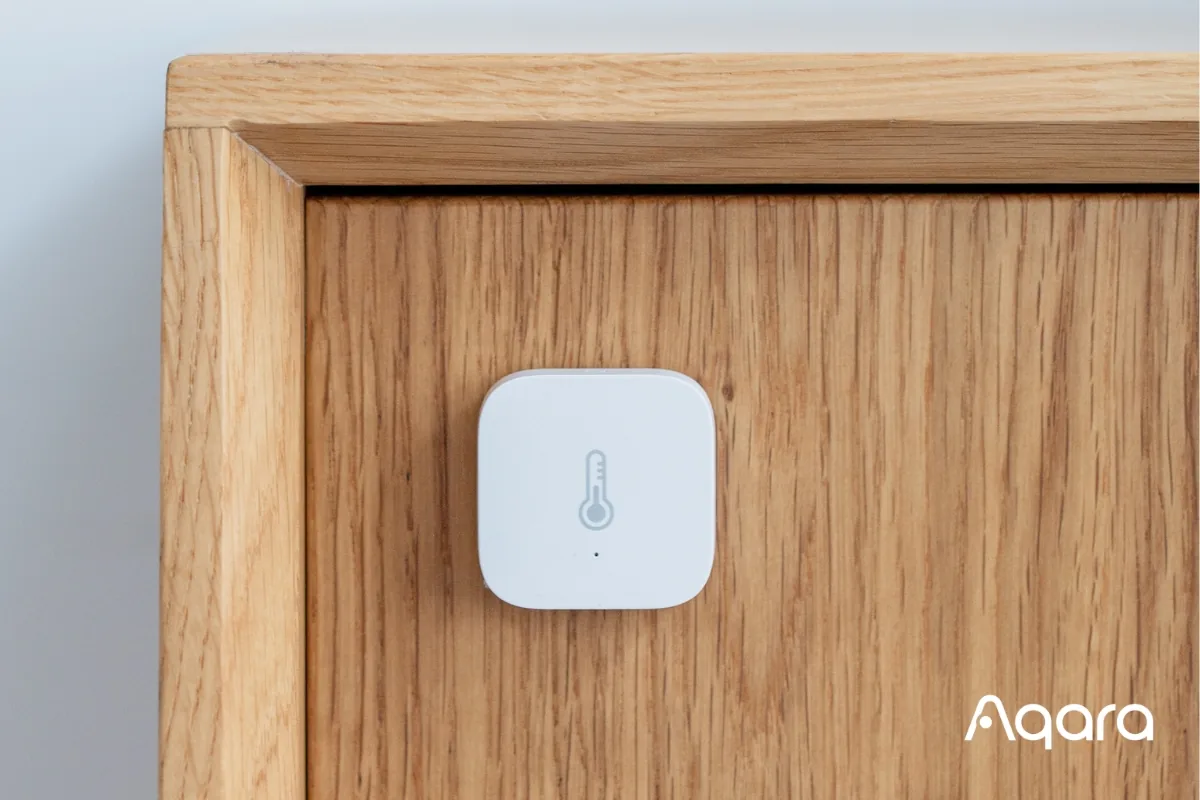
Aqara Temperature and Humidity Sensor Review (2026): Still the Best Budget Climate Sensor?
Aqara Temperature and Humidity Sensor Review (2026): Still the Best Budget Climate Sensor?
Disclosure: this guide contains no affiliate links — we earn no commission if you buy. We’d rather you know exactly where we stand.
Yes, the Aqara Temperature and Humidity Sensor T1 is still worth buying in 2026. At $19.99 it tracks temperature (±0.3°C), humidity (±3%), and air pressure with a Sensirion-grade sensor, runs up to two years on a single CR2032 coin cell, and plugs straight into HomeKit, Alexa, and Google Home — provided you pair it with an Aqara hub. It is not natively Matter over Thread, but Aqara’s newer Climate Sensor W100 covers that need.
That is the short version. The longer version covers everything we verified about the T1 in 2026: specs, price, hub requirements, the old square sensor it replaced, Matter status, and how it compares to the SwitchBot Meter.
What exactly are you buying?
The current model is the Temperature and Humidity Sensor T1 (model TH-S02D). It measures three things — temperature, relative humidity, and atmospheric pressure — and sends the readings over Zigbee 3.0 to an Aqara hub, which is what connects it to your phone and the rest of your smart home.
The headline numbers, all from Aqara’s published specifications:
- Temperature: −20°C to 50°C (−4°F to 122°F), accuracy ±0.3°C
- Humidity: 0–100% RH, accuracy ±3%
- Atmospheric pressure: 30–110 kPa, accuracy ±0.12 kPa
- Wireless: Zigbee 3.0 (hub required, no direct Wi-Fi or Bluetooth)
- Battery: 1 × CR2032, claimed up to 2 years
- Size: 36 × 36 × 9 mm — roughly the size of a large coin stack
- Price: $19.99 in the US, per Aqara’s official pricing
There is no display on the unit. It is a button-only puck: you stick it to a wall with the included adhesive, pair it once, and then read everything in the Aqara Home app, Apple Home, or your voice assistant of choice. Aqara sells it in the US through Amazon, Home Depot, Newegg, and Adorama.
The accuracy figures matter more than they look. A ±0.3°C tolerance and ±3% humidity reading from an industrial-grade Sensirion sensor is genuinely good at this price — dedicated HVAC thermometers costing three times as much do not do dramatically better. It is the kind of accuracy you can actually build automations on, which is the whole point.
T1 vs the old square sensor — what’s changed?
If you have been around smart homes for a while, you will recognise the T1 instantly: it looks identical to the older square Aqara sensor (model WSDCGQ11LM). Same 36 × 36 × 9 mm shell, same CR2032 battery, same sensor ranges and the same ±0.3°C / ±3% accuracy figures. Aqara essentially kept the hardware that worked and modernised the radio.
The two meaningful upgrades in the T1 generation:
- Zigbee 3.0 — the older sensor used an earlier Zigbee implementation; the T1 speaks the current standard, which means more reliable pairing and better behaviour on mixed Zigbee networks.
- Over-the-air (OTA) updates — the T1 can receive firmware updates through an Aqara hub. The old sensor was frozen at whatever firmware it shipped with.
Practically, that means: buy the T1 if you are buying new. The old WSDCGQ11LM still works fine if you already own one — there is no accuracy reason to replace it — but it is the previous generation, and new stock is increasingly the T1 anyway. One caveat carried over from both generations: the sensor is indoor-only, rated for non-condensing environments. Do not mount it in a shower cubicle or leave it out in the rain.
Does it need an Aqara hub?
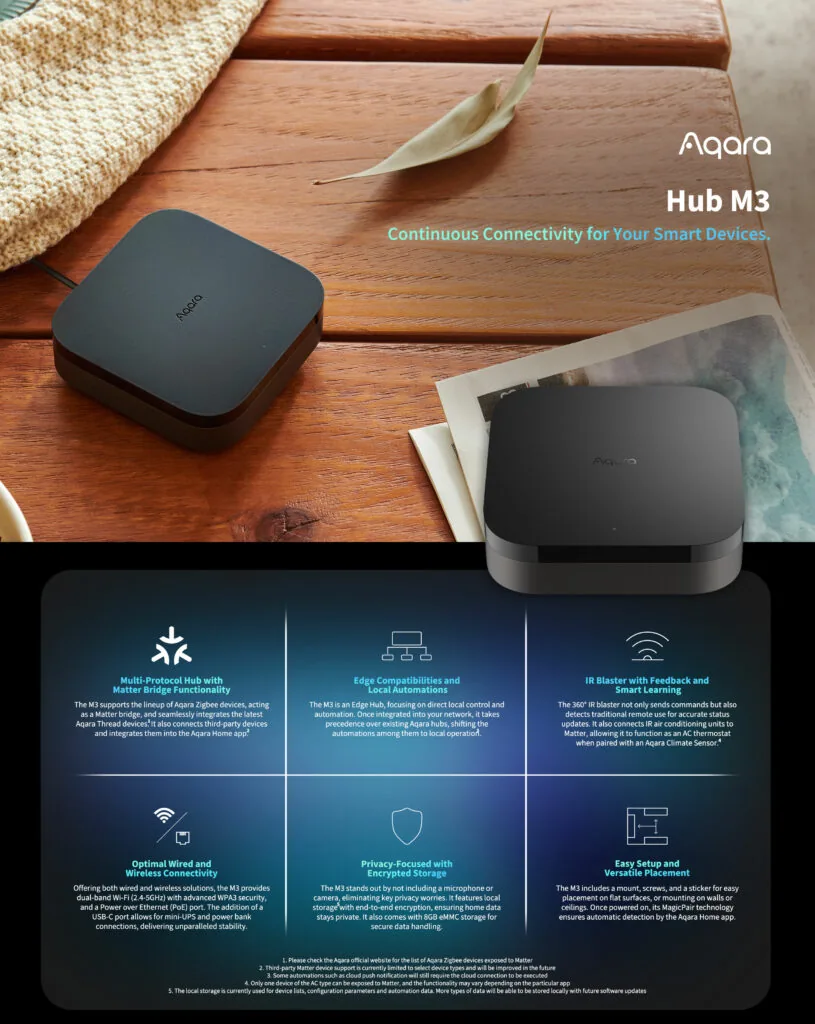
Short answer: yes, for the full experience. The T1 is a Zigbee end device. It cannot talk to your phone directly, and it has no Wi-Fi radio, so an Aqara Zigbee hub — the Hub M2, the newer Hub M3, the compact Hub E1, or one of Aqara’s camera hubs — sits between the sensor and everything else. The hub handles the Zigbee mesh, pushes readings to the cloud, and bridges the sensor into Apple Home, Alexa, and Google Home.
Aqara’s own listings are blunt about this: third-party hubs are not officially supported. That said, the Home Assistant and Zigbee2MQTT communities have run these sensors on third-party Zigbee coordinators for years with good results — a well-trodden but unofficial path. If you want the guaranteed, documented experience, buy the Aqara hub.
One practical note: keep the sensor within about 10 metres (33 ft) of the hub for a stable Zigbee connection, per Aqara’s guidance. In a larger home, Zigbee routers — Aqara smart plugs, for example — extend the mesh just like any other Zigbee network. If you are still weighing whether your setup needs a hub at all, our guide on whether you need a smart home hub in 2026 walks through the trade-offs, and do you need a hub for Matter devices covers how this changes with Matter.
Does it work with HomeKit, Alexa, and Google Home?
Yes — with the hub doing the translation. Once the T1 is paired to an Aqara hub, the temperature and humidity readings show up in the Aqara Home app, and the hub exposes the sensor to the big three ecosystems:
- Apple Home (HomeKit): the sensor appears as a temperature/humidity tile when bridged through a HomeKit-compatible Aqara hub. Multiple sensors in one home show an averaged temperature in the Home app’s climate view.
- Amazon Alexa and Google Home: readings surface through the hub’s integrations, so you can ask “what’s the bedroom humidity?” or use the readings as routine triggers.
- SmartThings: the T1 is also directly compatible with SmartThings via the Aeotec Smart Home Hub, according to Aqara’s regional distributors.
The important nuance: ecosystem availability is mediated by the hub, not the sensor. The T1 itself only speaks Zigbee. Whatever your hub can bridge — HomeKit, Alexa, Google — the sensor inherits. That is why the choice of hub (M2 vs M3 vs E1) matters more than most people expect; a Matter-controller hub like the M3 opens more doors, which brings us to the next question.
If you are deciding between voice platforms, our Alexa vs Google Home vs HomeKit comparison for 2026 and the Matter vs HomeKit explainer will help you pick the ecosystem before you buy the hardware.
Does it support Matter over Thread?
This is where precision matters, because Aqara now sells two very different climate sensors.
The T1 does not support Matter natively, and it does not use Thread. It is a Zigbee 3.0 device, full stop. It can appear in Matter ecosystems only when bridged through a Matter-controller Aqara hub such as the Hub M3 — the hub translates, the sensor stays Zigbee. That works fine in practice (your Matter app sees the sensor), but it is not the same as a native Matter-over-Thread device, and it means the sensor depends on the hub being online and Matter-capable.
Aqara’s Climate Sensor W100 (model TH-S04D) is the native option. It runs Thread and Zigbee dual-protocol with Bluetooth for setup, and supports Matter over Thread — pair it to any Matter controller (Apple TV, HomePod, Echo, Nest Hub) and it joins directly, no Aqara hub required. It is a bigger device (86 × 86 × 13.65 mm) with a built-in display showing readings at a glance, three customisable buttons for up to nine automation actions, and it lists around $39.99 — roughly double the T1. 9to5Mac‘s HomeKit Weekly column tested it and found the temperature and humidity tracking “nice and accurate,” calling the built-in screen easy to read “even from across the room.”
So: if you are building a Matter-first home in 2026, the W100 is the cleaner buy. If you already run an Aqara hub — or you are happy to — the T1 is half the price and does the same sensing job. Our what is Matter guide and the best Matter devices of 2026 roundup go deeper on which camp you are in.
How does it report, and is it responsive enough for automations?
A climate sensor is only as useful as its reporting behaviour. The T1 sips battery by being lazy when nothing is happening: in a stable room it reports roughly once an hour. When the environment moves, it wakes up — a temperature shift of more than 0.5°C, a humidity swing of more than 6%, or a pressure change of at least 25 Pa triggers an immediate report.
That behaviour is well-judged. Hourly heartbeats are plenty for trend graphs and comfort monitoring, and the instant-report thresholds catch the events you actually automate on: a shower spiking bathroom humidity, a door left open bleeding heat, a nursery drifting cold overnight. You would not use it as a safety-critical alarm sensor, but for comfort automations it is exactly responsive enough.
One honest limitation: with no display, you cannot glance at a wall and read the temperature. If that matters — hallway, nursery, anywhere guests look — the SwitchBot Meter Plus or Aqara’s own W100 with their screens are the answer, at a higher price.
Automations actually worth setting up
This is where a $19.99 sensor earns its keep. The EPA recommends keeping indoor relative humidity between 30% and 50% — above 60% invites mold and dust mites, below 30% brings dry skin, static, and irritated airways. A sensor in each key room turns that guidance into action:
- Bathroom exhaust fan: when humidity rises past ~65%, run the fan (via an Aqara smart plug or switch) until it falls back under 55%. This is the single highest-value automation for renters fighting bathroom mold.
- Nursery/bedroom alerts: push notification if temperature drops below your set floor overnight or humidity climbs past 60%.
- Humidifier/dehumidifier control: switch a humidifier on when winter air drops below 30% RH, or a dehumidifier when the basement pushes past 55%.
- Heating sanity checks: pair with a smart thermostat so heating decisions use the bedroom’s actual temperature, not the hallway where the thermostat happens to live.
A smart-home writer’s rule of thumb, from a HomeKit Weekly guide to per-room sensing: “One sensor can only tell you what’s happening where it sits. Most homes aren’t uniform: rooms near exterior walls swing more, bathrooms spike humidity, and hallways act like thermal buffers.” At roughly $47 for a three-pack on Amazon (seen October 2026), outfitting three rooms costs less than most single smart thermometers. Placement matters: interior walls, breathing height, away from direct sun, radiators, and HVAC airflow.
On the energy side, automating ventilation and dehumidification room-by-room — only when the target room needs it — cuts the waste of running whole-home systems on a timer. See do smart home devices actually save energy for the numbers.
Aqara T1 vs old square sensor vs SwitchBot Meter
| Aqara T1 (TH-S02D) | Aqara old square (WSDCGQ11LM) | SwitchBot Meter | |
|---|---|---|---|
| Typical price | $19.99 | ~$15–18 (remaining stock) | ~$10.99 |
| Temp accuracy | ±0.3°C | ±0.3°C | ±0.2°C (0–65°C) |
| Humidity accuracy | ±3% RH | ±3% RH | ±2% RH (10–90% RH) |
| Protocol | Zigbee 3.0 | Older Zigbee | Bluetooth 4.2 |
| Battery | CR2032, up to 2 years | CR2032, up to 2 years | 2 × AAA, ~1 year |
| Hub required | Yes (Aqara hub) | Yes (Aqara/Xiaomi gateway) | No for in-range use; SwitchBot Hub for remote/automations |
| Display | No | No | No (Meter Plus adds one) |
| OTA updates | Yes | No | Via app |
The SwitchBot Meter is the genuine budget alternative: cheaper, no hub needed if your phone is in Bluetooth range, and slightly tighter stated accuracy. Its weakness is the flip side — Bluetooth range (~120 m line-of-sight claimed, much less through walls) and no remote access or automations without a SwitchBot hub. MacRumors, reviewing Aqara’s ecosystem, summed up the T1’s position neatly: “the $19.99 Temperature and Humidity Sensor is affordable and reliable.”
Pick the Aqara T1 if you want Zigbee mesh reliability, HomeKit/Alexa/Google integration through a hub, and a two-year battery you will forget about. Pick the SwitchBot Meter if you want the cheapest possible reading on your phone and do not care about automations. And if you already own the old square Aqara sensor, keep it — the T1’s upgrades (Zigbee 3.0, OTA) are real but not worth rebuying hardware for.
Who should buy it — and who shouldn’t
Buy it if: you own (or plan to buy) an Aqara hub; you want per-room climate data feeding automations; you are in the Apple Home, Alexa, or Google Home world and want a cheap, accurate sensor; you are a renter who can only stick things to walls.
Skip it if: you refuse to buy a hub — a Wi-Fi or Bluetooth sensor (SwitchBot, or a Matter-over-Wi-Fi option) suits you better; you need a display on the device; you need outdoor or condensing-environment sensing (this is indoor-only); or you are going all-in on native Matter over Thread, in which case Aqara’s W100 is the purpose-built pick.
The verdict
The Aqara Temperature and Humidity Sensor T1 remains the best budget climate sensor for anyone already in — or willing to join — the Aqara ecosystem. The sensing is accurate, the battery lasts years, the automations are genuinely useful, and $19.99 per room is a price that makes multi-room monitoring a casual purchase rather than a project. Just go in with eyes open: the hub is mandatory, Matter only arrives via bridging, and the Thread-native future belongs to the W100. For Zigbee households in 2026, though, this little square is still the default answer.
Frequently asked questions
Does the Aqara temperature and humidity sensor need a hub?
Yes. The T1 communicates over Zigbee 3.0 and cannot connect to your phone directly, so an Aqara Zigbee hub (Hub M2, Hub M3, Hub E1, or a compatible Aqara camera hub) is required for app access, remote monitoring, and automations. Community projects like Zigbee2MQTT can pair it to third-party coordinators, but Aqara does not officially support that.
Does the Aqara temperature sensor work with Apple HomeKit?
Yes, when paired through a HomeKit-compatible Aqara hub. The hub bridges the sensor into Apple Home, where it appears as a temperature and humidity tile you can use in automations. The same hub bridging exposes it to Alexa and Google Home.
Is the Aqara T1 Matter compatible?
Not natively. The T1 is a Zigbee 3.0 device with no Thread radio. It can appear in Matter ecosystems when bridged through a Matter-controller Aqara hub like the Hub M3, but that is bridging, not native Matter. For native Matter over Thread, Aqara’s Climate Sensor W100 is the model to buy.
How accurate is the Aqara temperature and humidity sensor?
Per Aqara’s specifications, the T1 measures temperature from −20°C to 50°C with ±0.3°C accuracy, humidity from 0–100% RH with ±3% accuracy, and atmospheric pressure from 30–110 kPa with ±0.12 kPa accuracy, using an industrial-grade Sensirion sensor. That is solid for a sub-$20 device and sufficient for comfort automations.
What is the difference between the T1 and the old square Aqara sensor?
Almost nothing on the spec sheet — same size, same battery, same accuracy. The T1 (TH-S02D) upgrades the radio to Zigbee 3.0 and adds over-the-air firmware updates. If you are buying new, get the T1; if you own the old WSDCGQ11LM, there is no accuracy reason to replace it.
Can I use the Aqara temperature sensor outdoors?
No. Both the T1 and the older square sensor are rated for indoor use only, in non-condensing environments. For outdoor monitoring, look at IP-rated alternatives like SwitchBot’s IP65 Indoor/Outdoor meter.
Sources
- Aqara — The Best Smart Temperature and Humidity Sensor for Home Automation (US price $19.99; sold via Amazon, Home Depot, Newegg, Adorama)
- Aqara (NZ) — Temperature and Humidity Sensor T1 specifications (TH-S02D: −20–50°C ±0.3°C; 0–100% RH ±3%; 30–110 kPa ±0.12 kPa; Zigbee 3.0; CR2032; 2-year battery; 36×36×9 mm)
- PassionHome — Aqara Temperature and Humidity Sensor T1 (reporting behaviour: hourly when stable; instant on 0.5°C / 6% RH / 25 Pa changes; Matter via Hub M3 bridging only)
- JDK Benelux — Aqara Temperature and Humidity Sensor T1 (T1 as successor: Zigbee 3.0 + OTA updates; ecosystem support via Aqara hubs)
- Manuals.Plus — Aqara T1 user manual (full specifications)
- Manuals.Plus — Aqara WSDCGQ11LM user manual (older square sensor specifications)
- Aqara (NZ) — Climate Sensor W100 specifications (TH-S04D: Thread/Zigbee + Bluetooth; −20–60°C; 0–98% RH; 86×86×13.65 mm)
- 9to5Mac — HomeKit Weekly: Aqara’s W100 Climate Sensor (hands-on: accurate tracking, readable display)
- UMA Technology — HomeKit Weekly: putting an Aqara temperature and humidity sensor in every room (hub requirement; 3-pack $46.99 seen Oct 2026; per-room sensing guide)
- MacRumors (via AIVAnet) — Review: Aqara’s HomeKit H1 Switches, Temperature Sensor, and Hub M2 (“affordable and reliable”)
- SwitchBot US — Meter Plus specifications (BLE 4.2; ±0.2°C / ±2% RH; 2×AAA ~1 year)
- Filtrete — How to Understand and Control Home Humidity Levels (EPA recommends 30–50% indoor RH)
- Alza — Aqara Temperature and Humidity Sensor T1 (€19.99; 4.7/5 from 106 ratings)




5 Comments